
Chrome has become the center of modern digital work. Whether someone is researching a topic, managing a business, developing software, or studying online, the browser often contains everything needed to complete daily tasks.
The problem is that browser organization becomes increasingly difficult as workflows grow.
A few open tabs can quickly turn into dozens or even hundreds. Important pages become difficult to find, duplicate tabs consume resources, and closing the wrong window can mean losing valuable work.
Many users try to solve this problem with a traditional bookmark manager or basic tab grouping tools. While these options can help with simple organization, they are not always designed for modern workflows where users need to save complete browser environments and return to them later.
This is where advanced session management tools become important.
A powerful session manager does more than store open tabs. It helps users save browsing sessions, restore tabs, organize projects, reduce browser clutter, and maintain productivity.
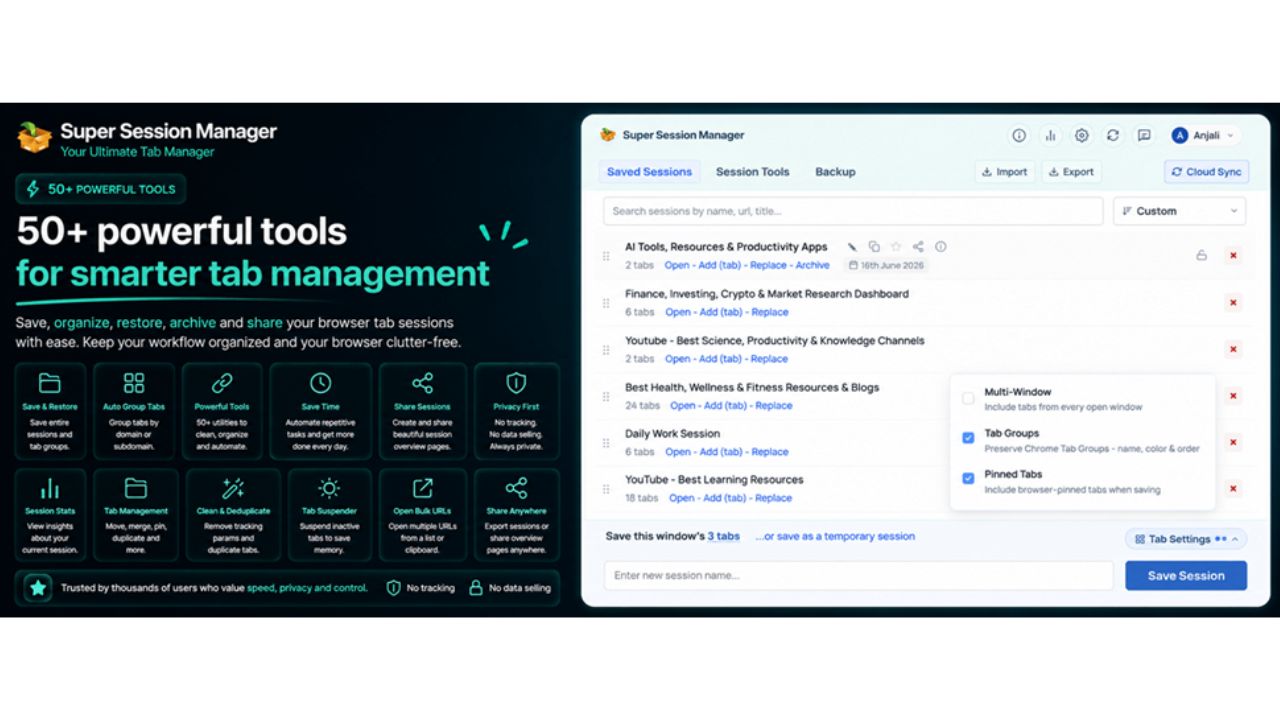
Among the available Chrome extensions for productivity tools, Super Session Manager stands out by combining session management, tab organization, memory optimization, privacy features, and backup options into one complete solution.
Why Bookmark Managers Alone Cannot Solve Modern Browser Clutter.
A tab manager remains useful for storing websites that users want to revisit regularly.
Examples include:
- Development documentation
- Frequently used tools
- Online platforms
- Reference websites
However, bookmarks are designed for long-term storage, not active projects.
Modern users often work with temporary but important browser environments.
For example:
A content creator may have research articles, competitor pages, writing tools, and image resources open for a single project.
A developer may need documentation, repositories, testing platforms, and technical references open simultaneously.
A student may collect dozens of sources for a research assignment.
Saving every page as a bookmark creates another problem: hundreds of saved links without the original context.
A session based approach solves this by preserving the complete workflow instead of individual pages.
What Makes a Modern Session Manager Different?
Not every browser organization tool provides the same experience.
The best solutions focus on helping users maintain their workflow without unnecessary complexity.
Important features include:
Session Saving and Restoration
Users should be able to save a complete browser window and reopen it whenever required.
Fast Tab Recovery
A reliable tool should make it easy to restore tabs after accidental closures, crashes, or device changes.
Smart Organization
Different projects should be separated into dedicated sessions instead of remaining mixed together.
Memory Management
A large number of active tabs can slow down browser performance, so built-in optimization features provide additional value.
Backup and Portability
Users should have control over exporting, importing, and protecting their saved sessions.
Privacy Controls
Extensions managing browsing activity should provide transparency and minimize unnecessary access.
Comparing Different Approaches to Tab Management.
There are three common ways users manage browser information.
Traditional Bookmark Manager
Best for:
- Permanent websites
- Frequently visited resources
- Long-term references
Limitations:
- Does not preserve complete workflows
- Requires manual organization
- Does not help recover active sessions
Basic Tab Manager Extensions
Best for:
- Viewing open tabs
- Creating simple groups
- Reducing visible clutter
Limitations:
- Limited backup options
- Few recovery features
- Usually focused only on current browser activity
Advanced Session Management Tools
Best for:
- Professional workflows
- Research projects
- Development environments
- Large browser sessions
Advantages:
- Save complete workspaces
- Restore previous environments
- Organize projects
- Reduce repetitive work
This is where Super Session Manager provides additional value.

Super Session Manager: A Complete Browser Organization Tool.
Super Session Manager is designed for users who need more than simple tab grouping.
Instead of treating tabs as separate pages, it allows users to save complete browsing sessions and restore them whenever necessary.
Users can create sessions for different activities, such as:
- Client projects
- Research work
- Development tasks
- Learning resources
- Personal planning
This makes it easier to switch between different workflows without reopening everything manually.
The extension combines multiple productivity features, including:
- Session saving and restoration
- Automatic snapshots
- Tab suspension
- Duplicate tab detection
- URL cleaning
- Session analytics
- Cloud synchronization
- Import and export options
- Privacy-focused storage
Restore Tabs and Continue Where You Left Off.
One of the biggest advantages of using a session manager is avoiding the frustration of losing important browser work.
A browser crash, accidental closure, or system restart can interrupt an entire workflow.
Instead of searching through browser history or reopening every website individually, users can quickly restore tabs from previously saved sessions.
This is especially valuable for:
- Researchers handling multiple sources
- Developers managing technical resources
- Marketers working with campaigns
- Professionals managing different projects
The ability to return to a complete workspace saves time and reduces unnecessary repetition.
Automatic Snapshots Protect Important Work.
Manual saving is useful, but users do not always remember to save a session before closing Chrome.
Super Session Manager includes automatic snapshots that capture recent browser activity in the background.
These snapshots provide an additional safety layer against:
- Unexpected browser crashes
- Accidental window closures
- System restarts
For users who depend on browser-based workflows, automatic recovery can prevent the loss of valuable research and project information.
Tab Suspender Helps Improve Browser Performance.
Large numbers of open tabs can affect computer performance.
Many users keep important pages open for later, but inactive tabs continue consuming system resources.
Super Session Manager includes a built-in Tab Suspender feature that helps reduce unnecessary memory usage.
Users can customize sleep durations based on their preferences.
Benefits include:
- Lower RAM consumption
- Reduced CPU usage
- Better browser performance
- Smoother multitasking
Suspended tabs remain available and can be restored when needed, making it easier to maintain organized workflows without slowing down the browser.
Duplicate Tab Detection Keeps Sessions Cleaner.

Duplicate tabs are a common problem for users who perform research or manage multiple projects.
Opening similar pages repeatedly can create confusion and make browser sessions harder to navigate.
Super Session Manager helps identify duplicate tabs and remove unnecessary clutter.
This creates cleaner sessions and makes important resources easier to access.
A cleaner browser environment also improves focus by reducing distractions.
URL Cleaner Improves Organization and Privacy.
Saved sessions can become difficult to manage when websites contain long tracking URLs.
Marketing parameters such as tracking codes can make links appear messy and harder to understand.
Super Session Manager includes URL cleaning features that remove unnecessary tracking elements.
This helps users maintain:
- Cleaner saved sessions
- Easier sharing
- Better organization
- Improved privacy
For professionals managing large collections of browser resources, clean URLs make information easier to handle.
Session Analytics Provide Better Visibility.
Understanding browsing habits can help users improve their workflow.
Super Session Manager includes session statistics and analytics features that provide insights into browser activity.
Users can view information such as commonly accessed domains within saved sessions and open tabs.
These insights can help identify frequently used resources and improve organization strategies.
Cloud Sync and Import/Export Support.
Modern professionals often use multiple devices.
A session saved on one computer should remain accessible when moving to another device.
Super Session Manager supports cloud synchronization, allowing users to access saved sessions more conveniently.
It also provides import and export functionality for backup and migration.
Users can:
- Create JSON backups
- Transfer sessions between devices
- Protect important workflows
- Restore previous environments
This makes managing browser sessions easier during device changes or system upgrades.
Privacy Focused Design for Modern Users.
Browser extensions that manage tabs require access to browsing information, making privacy an important consideration.
Super Session Manager follows a privacy focused approach with features designed around user control.
Key privacy benefits include:
- Local-first storage by default
- Minimal browser permissions
- Manifest V3 compatibility
- No third-party advertising SDKs
- User-controlled session backups
This approach allows users to organize their browser without unnecessary data collection concerns.
Final Comparison: Which Tool Fits Modern Browsing?
A bookmark manager is still useful for permanent website storage.
A simple tab manager can help with basic organization.
However, users with complex workflows need a more complete solution.
Super Session Manager combines the features needed for modern browser productivity:
- Session management
- Tab organization
- Tab restoration
- Memory optimization
- Privacy protection
- Backup and synchronization
For anyone searching for a powerful tab manager, advanced session manager, or a smarter alternative to traditional bookmarking, Super Session Manager provides a practical way to organize Chrome in 2026.
Instead of allowing browser tabs to become overwhelming, users can create structured digital workspaces that support the way they actually work.